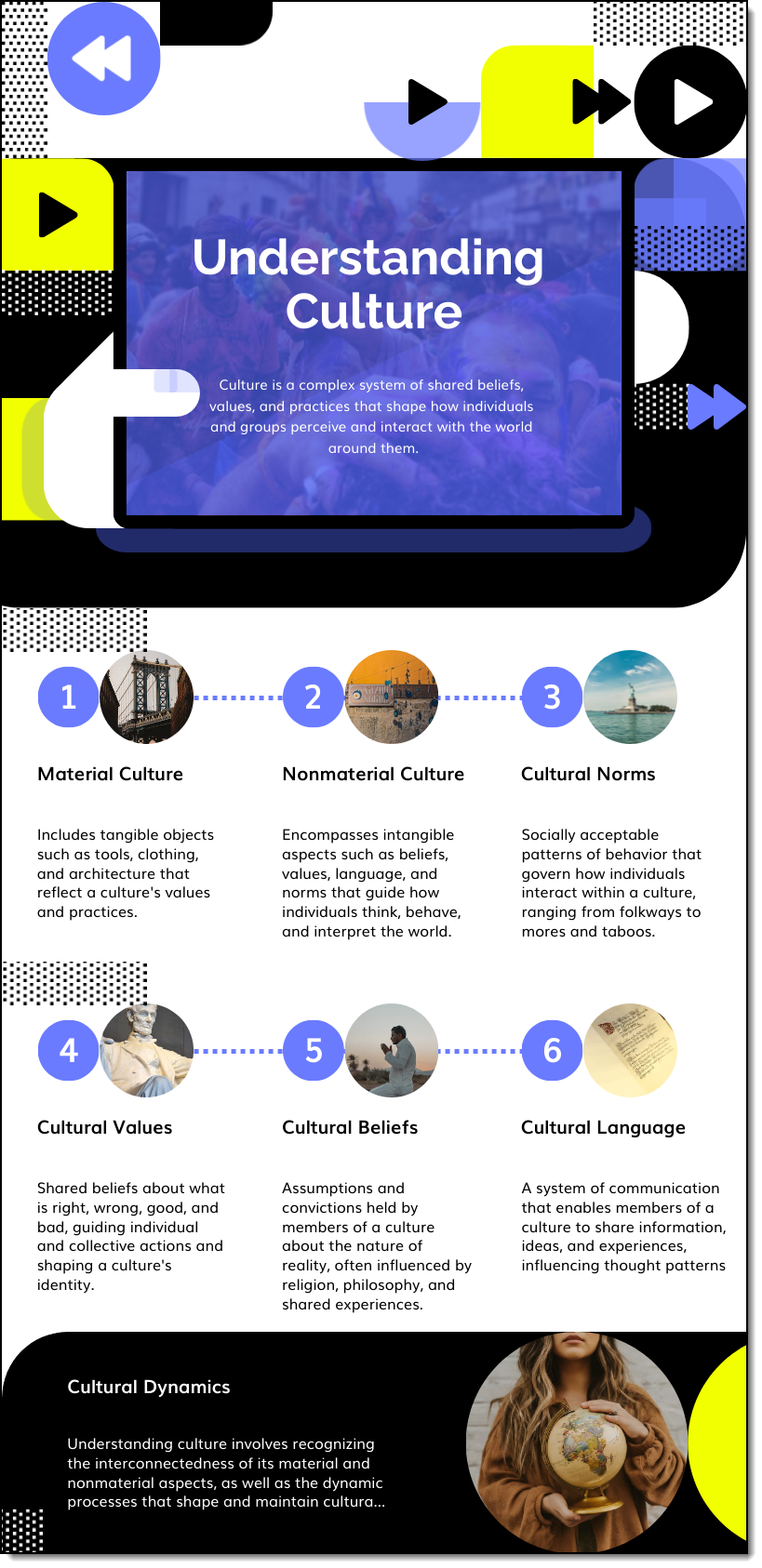
Understanding Cultures
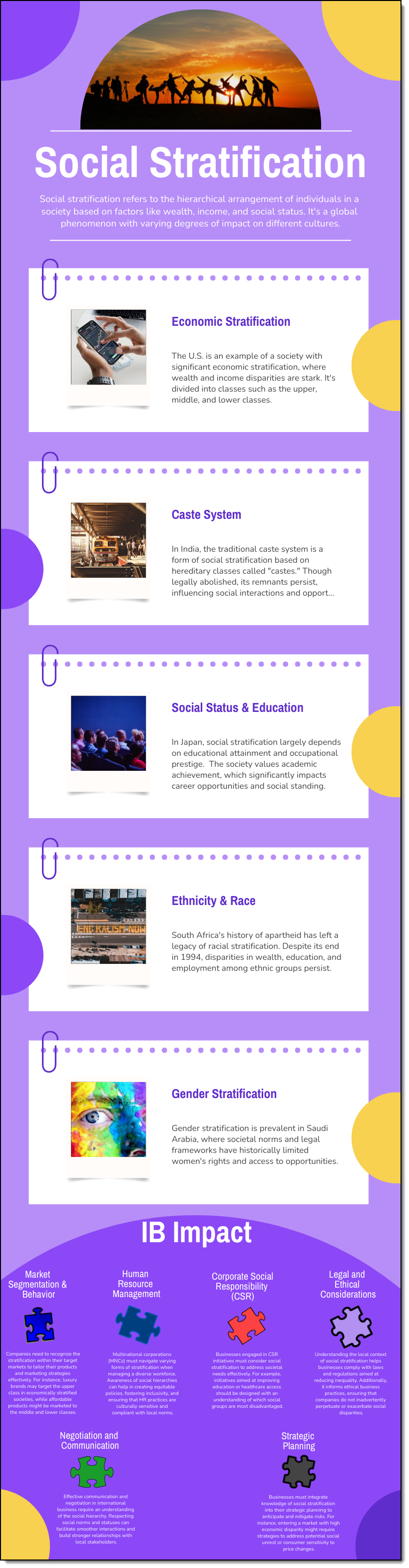
Social Stratification
Language & Culture
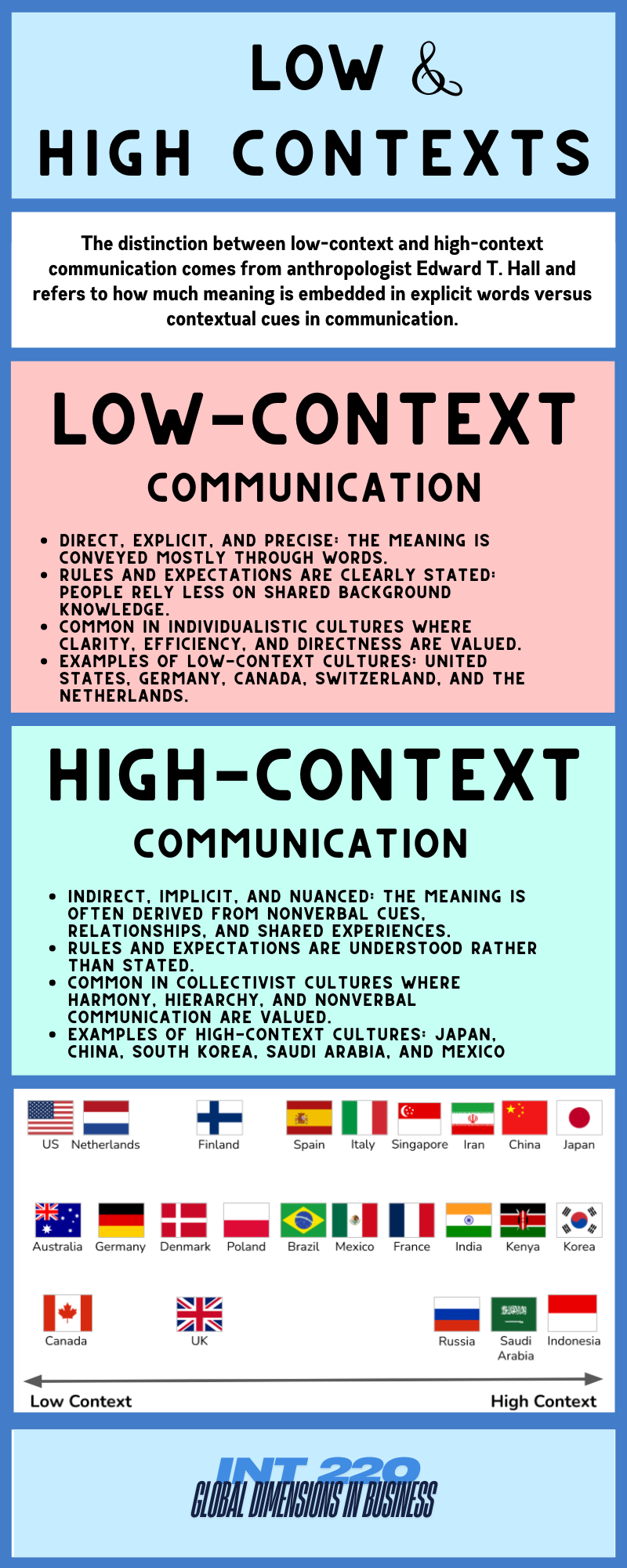
High & Low Context
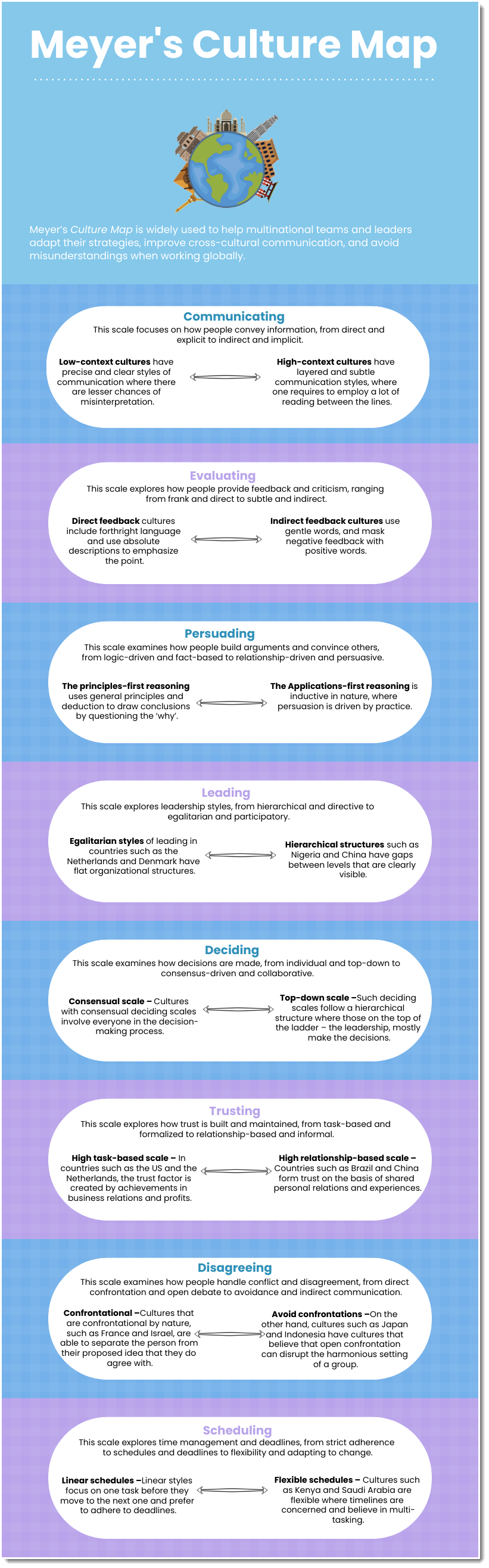
Meyer's Cultural Map
Religion & Culture
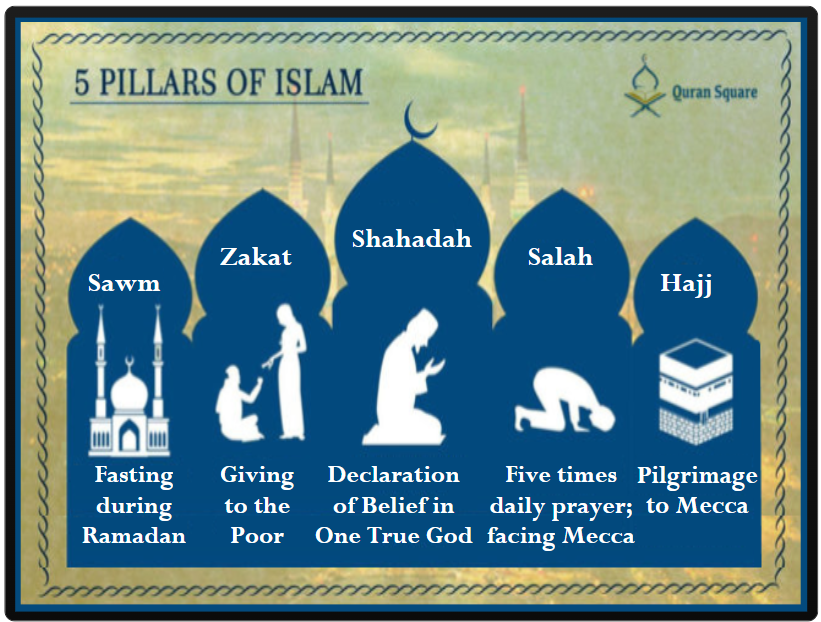
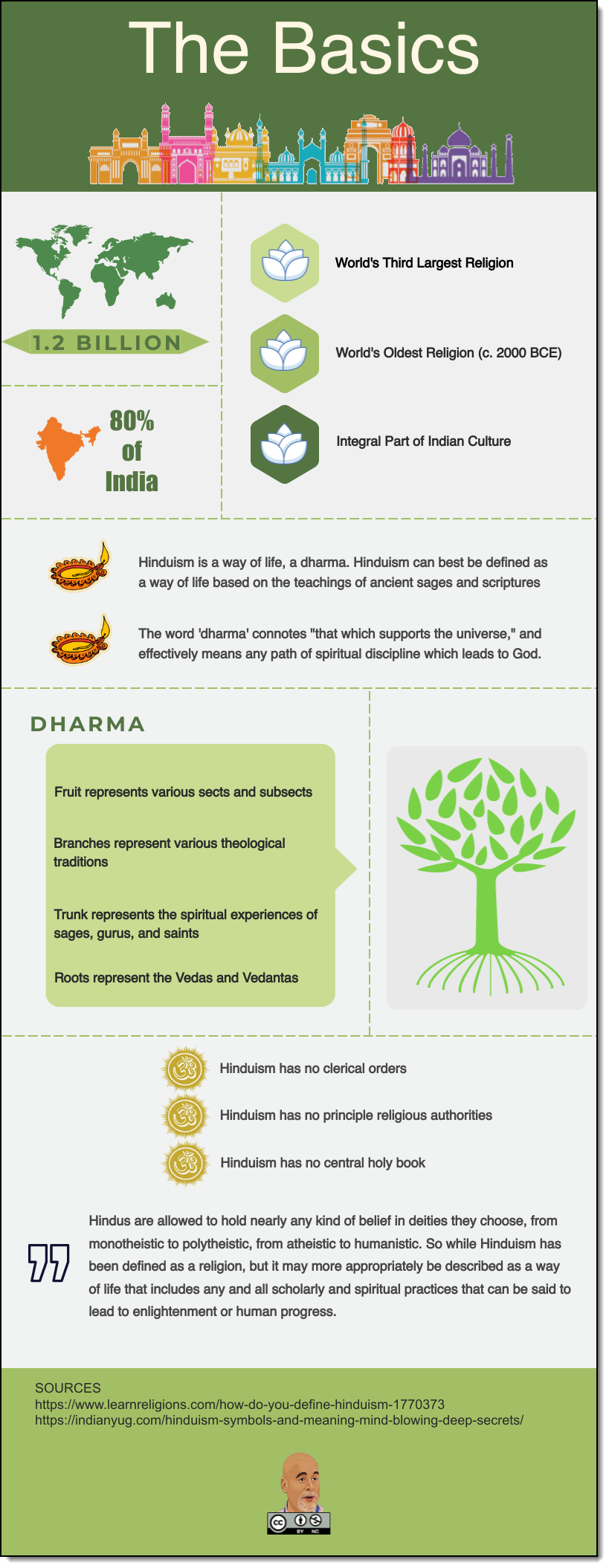
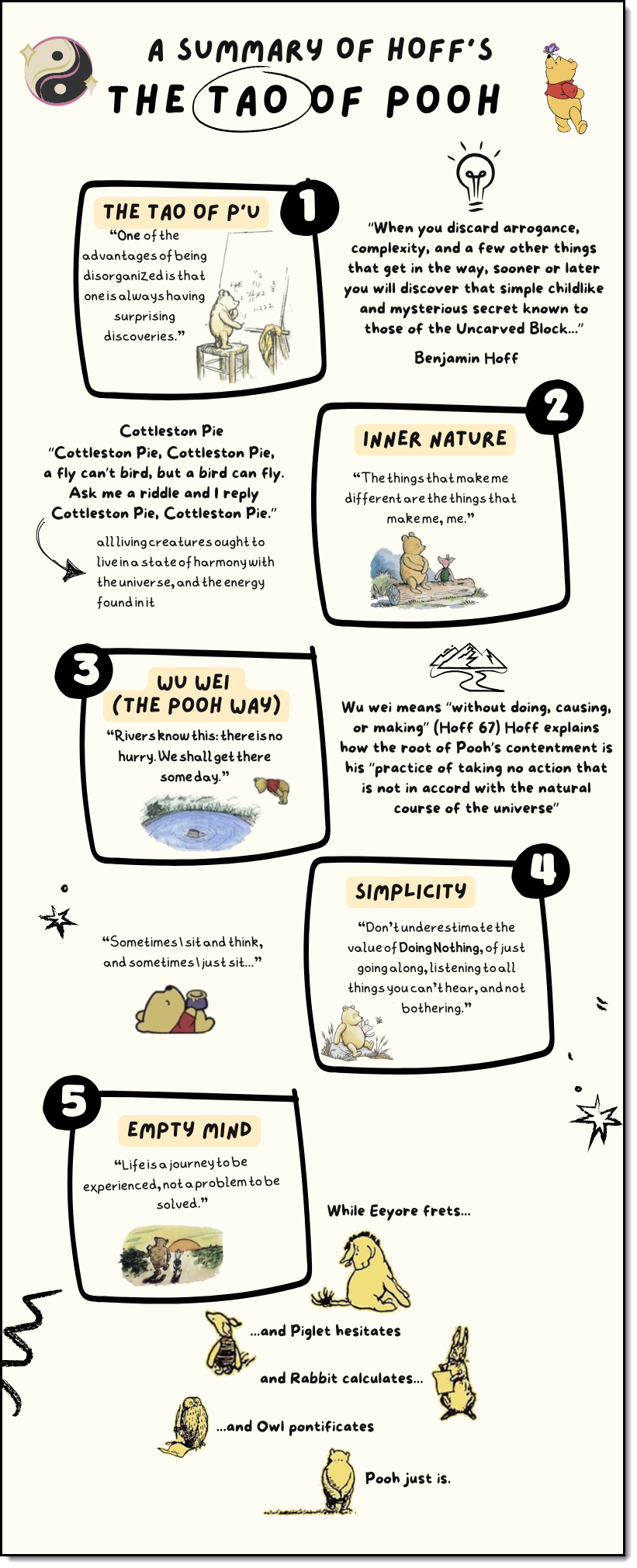
Class Activities
Roll the Die!
- Step 1 - Break into groups.
- Step 2: roll the die found here
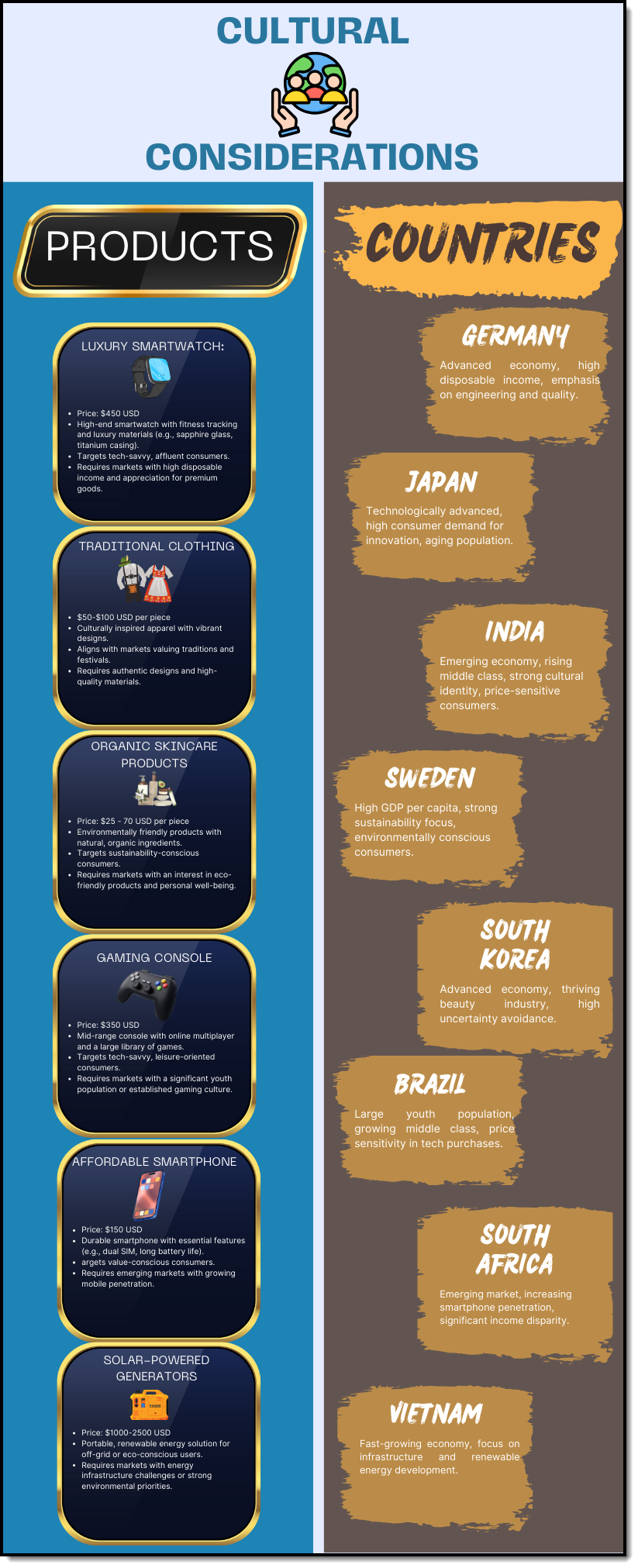
- Step 3: Study the product related to your number. Assume that you are an analyst with an American-based MNC and this is the product you will use to cross borders.
- Step 4: Using the Country Comparison Tool consider the product, its cultural ramifications, and pick any one of the eight countries listed in the infographic as your prime target.
- Step 5: Open padlet and record the country you have selected.
- Step 6: which 1 - 2 of Hofstede's cultural dimensions did you find most helpful in identifying a culturally resonate market?
- Step 7: using the same product and country, how might you market the product in the proposed country? Pick one of the rows from the table below; the right-hand column represents your company's target country.
Roll the Die! Part 2
Using the product list offered below, assume that you are also targeting a second country, in which, one of the faith systems we have studied is prevalent. If possible, use the same teams as you did in #RolltheDie and discuss what the business and marketing implications for entering the new country might be.
Open padlet and record your analysis.
Use the resources found in the right-hand menu of this page, or, visit the following OER resource:

Culture Club
Description
Culture Club is the Week 4 asynchronous individual activity for INT 220. Students work as analysts for Venturea, the U.S.-based renewable-energy company used throughout the Four Lands project. Each student receives a randomly assigned real-world market and then works with the Venturea Culture Coach custom GPT to evaluate how culture should influence Venturea’s international strategy.
The student chooses one of Venturea’s three product lines:
- High-Efficiency Solar Panels
- Next-Generation Wind Turbines
- Advanced Grid Storage Solutions
Culture Coach then guides the student through the cultural implications of entering the assigned market and helps the student reason toward the most advantageous mode of entry. Mode of entry is introduced here as just-in-time support rather than assumed prior knowledge.
Purpose
The purpose of Culture Club is to move students beyond simply identifying cultural characteristics. Students must connect culture to an actual international-business decision by asking what Venturea would need to change, preserve, or manage differently when crossing a border.
The activity also provides early exposure to mode-of-entry decisions before those strategies are formally studied later in the course. The emphasis is on defensible reasoning, not memorizing entry-mode terminology.
Using a randomly assigned country reduces repeated use of familiar markets and makes previously submitted student work less reusable. Because every student works with the same company but may receive a different country and choose a different Venturea product line, the shared results provide a useful comparison of how international strategy changes across markets.
Student Process
Students begin at:
https://www.kurtstuke.com/OER/IB/Hybrid/CultureClub/
The student enters a name and receives a locked assigned country and a unique
Culture Club activity code beginning with CC-. Refreshing the activity does not
provide a new country.
Before launching Culture Coach, students are reminded that they must be signed in to ChatGPT. A free ChatGPT account is sufficient.
The student must give Culture Coach both the assigned country and the exact activity code. A typical opening message is:
My Venturea Culture Club market is Saudi Arabia. My activity code is CC-7AAAF5. Please begin the exercise.
The activity code is critical because it allows the result generated by Culture Coach to be matched to the record originally created by the HTML activity.
Culture Coach then asks the student which Venturea product line they want to pitch and guides the student through the cultural analysis and mode-of-entry decision. At the end of the interaction, Culture Coach awards a score and submits the result to the course server through a custom GPT Action.
Students may be asked by ChatGPT to approve sending the final result to
kurtstuke.com. They must approve that request for the result to reach the
instructor console.
The shared results page is:
https://www.kurtstuke.com/OER/IB/Hybrid/CultureClub/results.php
The shared display is designed to emphasize the assigned market, Venturea product line, cultural issue, recommended mode of entry, and final score rather than the student’s full ChatGPT conversation.
Instructor Setup and Administration
The instructor console is located at:
https://www.kurtstuke.com/OER/IB/Hybrid/CultureClub/instructor.php
Instructor password: INT220
The instructor console displays issued assignments and their current status. A newly generated student assignment will normally appear as Waiting for Culture Coach. Once the GPT Action successfully submits the completed result, the status changes to a completed or verified state and the result becomes eligible for the shared results page.
Culture Club uses PHP and JSON storage on the course server. The custom GPT Action sends the
final result to the Culture Club PHP endpoint using the student’s activity code as the matching
identifier. The GPT Action uses an API key stored separately from the instructor password.
The API key in the GPT configuration must match the GPT_ACTION_KEY value in the
live CultureClub/config.php file.
The GPT Action also requires the public privacy-policy page:
https://www.kurtstuke.com/OER/IB/Hybrid/CultureClub/privacy.html
A screenshot/manual-verification workflow exists as a fallback if the automatic GPT submission fails.
At the end of a class or course section, use Archive & Reset from the instructor console. This archives the current activity data and clears the live assignment and results files for the next group of students. It is preferable to use the console rather than manually replacing JSON files.
Culture Lens
Description
Culture Lens is the Week 4 in-person team activity for INT 220. It uses Venturea and the Four Lands project as a controlled environment for applying Hofstede-style cultural dimensions to an international market decision.
The interaction supports up to six team screens. Each team selects one of the Four Lands markets and then identifies three cultural dimensions it believes are especially important to Venturea.
The defining feature of the activity is that students enter both the United States score and the selected market score for each chosen dimension. The application automatically calculates the cultural delta:
Selected Market Score - U.S. Score
This allows students to focus not merely on individual country scores, but on the relative cultural distance Venturea may encounter when moving from its U.S. home market into the selected country.
Purpose
Culture Lens is designed to prevent Hofstede’s framework from becoming a score-reading exercise.
Students are asked to determine which cultural dimensions actually matter to Venturea, how large the U.S.–market difference is, whether that difference creates a meaningful business challenge, what Venturea might need to adapt, and whether the cultural environment strengthens or weakens the market’s overall viability.
A large delta is not automatically treated as negative. Instead, students are encouraged to distinguish between cultural distance and strategic difficulty. A large gap may simply identify an area where Venturea will need stronger adaptation, local knowledge, or different management practices.
Student Process
Students launch Culture Lens at:
https://www.kurtstuke.com/OER/IB/Hybrid/CultureLens/
The instructor should assign each group to one of the six available team screens.
Once inside the activity, students have direct access to the supporting Four Lands resources:
- Four Lands Project
- About Venturea
- Country Comparison Tool
- Four Lands Cultural Analysis
- Four Lands Economic Analysis
These links are intentionally embedded inside Culture Lens so students do not need to navigate back through the weekly course page while working.
Each team then:
- Selects a Four Lands market.
- Chooses three different cultural dimensions.
- Enters the U.S. score for each dimension.
- Enters the selected market score.
- Reviews the automatically calculated delta.
- Explains why each dimension matters specifically to Venturea.
- Identifies the most strategically important of the three dimensions.
- Assigns a cultural-viability judgment.
- Recommends one adaptation Venturea should make.
- Submits a concise final recommendation.
Teams may revise their submission. A later submission from the same team screen replaces that team’s earlier result.
The shared classroom display is:
https://www.kurtstuke.com/OER/IB/Hybrid/CultureLens/results.php
The shared page is designed for projection and automatically refreshes. It displays the U.S. score, host-market score, delta, priority dimension, cultural-viability judgment, adaptation, and recommendation for each participating team.
Instructor Setup and Administration
The instructor console is:
https://www.kurtstuke.com/OER/IB/Hybrid/CultureLens/instructor.php
Instructor password: INT220
Before class, assign groups to Team 1 through Team 6. During the activity, the instructor can project the shared-results page while teams work or wait until the debrief.
A productive debrief is to focus on the delta rather than only the raw scores. Useful prompts include:
- Which team identified the largest cultural gap?
- Which large gaps actually matter to Venturea?
- Can a market have a large cultural distance and still be attractive?
- Why did two teams studying the same market prioritize different dimensions?
- What adaptation would reduce the risk created by the cultural difference?
Culture Lens is built with PHP and JSON and does not require an external database. The principal files are:
index.php— student/team interactionresults.php— shared six-team displayinstructor.php— instructor console and reset controlsconfig.php— password and helper functionsdata/results.json— current live submissionsdata/archive/— archived class results
PHP must have write permission to both data/results.json and the
data/archive/ directory.
At the end of a class, open the instructor console and use Archive & Reset. The current results are copied into the archive directory with a timestamp and the six live team slots are cleared. The shared-results display will then return to six waiting cards, ready for the next class.
If you conduct a test run before class, remember to Archive & Reset afterward so the test submission does not remain visible to students.
For future reference: both Week 4 instructor consoles currently use the
password INT220.
Notebook Generated Videos
Global Business & Belief
Culture's Business Impact
Culture & Communication
Glossary
- Culture: The collection of values, beliefs, behaviors, customs, and attitudes that distinguish a society.
- Social Structure: The overall framework that determines the roles of individuals within a society, the stratification of a society, and individuals’ mobility within a society.
- Social Stratification: The categorizing of people on the basis of their birth, occupation, educational achievements, and/or other attributes.
- Social Mobility: The ability of individuals to move from one stratum of society to another.
- Values: The principles and standards accepted by members of a society.
- Attitudes: The actions, feelings, and thoughts that result from those values.
- Low-Context Culture: A culture in which communication is explicit and direct.
- High-Context Culture: A culture in which communication relies heavily on implicit cues and nonverbal signals.
- Cultural Cluster: A group of countries that share many cultural similarities.
- Individualism: The cultural belief that the person comes first.
- Collectivism: The belief that the group comes first.
- Power Respect: The acceptance of the power and authority of superiors based on their position in the hierarchy.
- Power Tolerance: Less significance attached to a person’s position in the hierarchy.
- Uncertainty Acceptance: The feeling that people have regarding uncertain and ambiguous situations that are stimulating and offer opportunities.
- Uncertainty Avoidance: Disliking and avoiding ambiguity.
- Aggressive Goal Behavior: Placing a high premium on material possessions, money, and assertiveness.
- Passive Goal Behavior: Placing a higher value on social relationships, quality of life, and concern for others.
- Long-Term Orientation: A focus on the future and perseverance.
- Short-Term Orientation: A focus on the past and present and immediate gratification.
- Indulgence: A cultural orientation that values leisure time, pleasure, and optimism.
- Restraint: A cultural orientation that emphasizes self-control and regulating the actions of cultural members
- Cultural Convergence: The growing similarity of cultures as a result of improvements in communication and transportation.
- Self-Reference Criterion: The unconscious use of one’s own culture to assess new surroundings.
- Cross-Cultural Literacy: Understanding and adapting to cultural differences.